Calling Dashboard V2
The same funnel, with three things the first one does not have: data quality, which lists are being worked, and a stage between connect and completion.
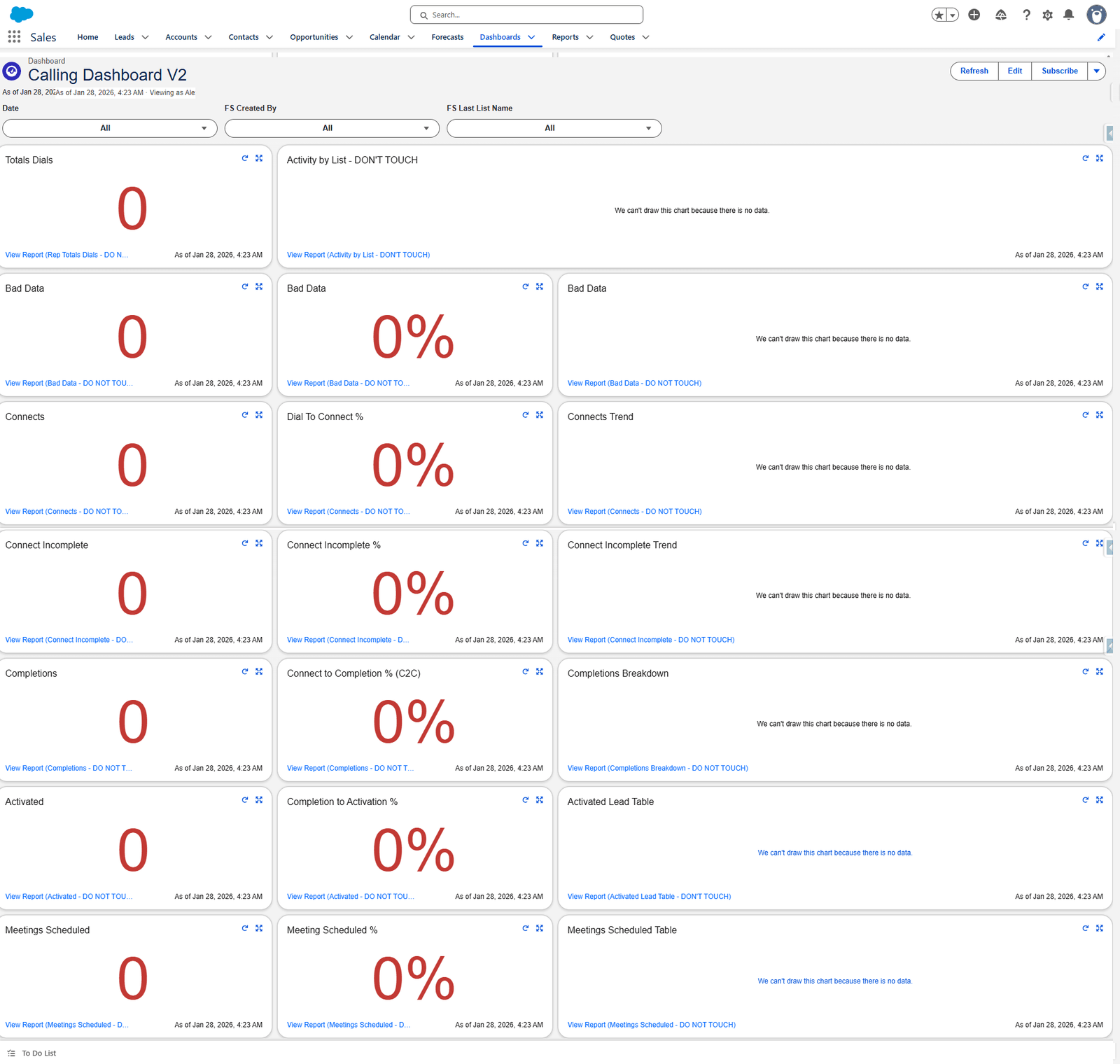
What changed from V1
| Added | Why |
|---|---|
| Activity by List | Which calling lists are actually getting called |
| Bad Data — three tiles | How much of the list is wrong |
| Connect Incomplete — three tiles | Reached somebody but did not finish: a stage V1 hid |
| Completions Breakdown | Why calls completed, not just how many |
| Activated Lead Table and Meetings Scheduled Table | The actual people, not just a count |
| Removed | Why |
|---|---|
| Dials by Rep | The filter does the same job |
| The Activated and Meetings trends | Crowded out |
Filters
| Filter | From |
|---|---|
| Date | Activity |
| FS Created By | Activity |
| FS Last List Name | Activity |
Campaign // List Name is gone, replaced by FS Last List Name. The first is a Contact field, the second is an Activity field — so V2 filters by the list the call was made from rather than the list the contact belongs to.
That is a meaningful difference. A contact can sit on one list and be called from another; V2 tells you about the calling, V1 about the people.
Tile by tile
| Tile | Report | Shown as | Measure | Ranges |
|---|---|---|---|---|
| Totals Dials | Rep Totals Dials | Metric | Sum of Rep Attempts | 33 / 67 |
| Activity by List | Activity by List | Horizontal bar — Campaign // List Name × Record Count | — | |
| Bad Data | Bad Data | Metric | Sum of Bad Data | 1 / 4 |
| Bad Data | Bad Data | Metric | Bad Data % | 5 / 10 |
| Bad Data | Bad Data | Donut — sliced by Call Result | Sum of Bad Data | — |
| Connects | Connects | Metric | Sum of Connects Counter | 10 / 40 |
| Dial To Connect % | Connects | Metric | D2C% | 15 / 20 |
| Connects Trend | Connects | Line — Date × Sum of Connects Counter | — | |
| Connect Incomplete | Connect Incomplete | Metric | Sum of Connect - Incomplete | 4 / 10 |
| Connect Incomplete % | Connect Incomplete | Metric | Connect - Incomplete % | 5 / 25 |
| Connect Incomplete Trend | Connect Incomplete | Line — Date × Sum of Connect - Incomplete | — | |
| Completions | Completions | Metric | Sum of Correct Completes | 10 / 35 |
| Connect to Completion % (C2C) | Completions | Metric | Correct Complete % | 50 / 60 |
| Completions Breakdown | Completions Breakdown | Donut — sliced by Call Result | Record Count | — |
| Activated | Activated | Metric | Sum of Activated Connects | 5 / 18 |
| Completion to Activation % | Activated | Metric | Activated Connects % | 15 / 20 |
| Activated Lead Table | Activated Lead Table | Table — Account Name, Title, Follow Up Date | — | |
| Meetings Scheduled | Meetings Scheduled | Metric | Sum of Meeting Scheduled Connects | 2 / 4 |
| Meeting Scheduled % | Meetings Scheduled | Metric | Meeting Scheduled Connect % | 5 / 10 |
| Meetings Scheduled Table | Meetings Scheduled | Table — Account Name, Title, Follow Up Date | — |
The Meetings Scheduled Table tile reads the Meetings Scheduled report displayed as a table — not the separate Meetings Scheduled Table report, which exists but is not what this tile points at. Worth knowing before you edit either.
The three Bad Data tiles
They are the same report three ways, and they answer three different questions:
| Tile | Answers |
|---|---|
| Count | How many bad records did we find? |
| Percent | How bad is the list? |
| Donut | What kind of bad — wrong person, or gone? |
The donut is set to combine small groups into "Others", show a total, sort the legend, and display at most six values. Past six, everything else collapses into one slice — so a long tail of distinct problems reads as a single blob.
Connect Incomplete is the useful addition
V1 goes straight from Connects to Completions, so a call where somebody answered but the conversation did not finish just looks like a missing completion.
V2 counts them. A rising Connect Incomplete % against a steady connect rate means calls are being reached and lost — which is a coaching problem, not a list problem.
What goes wrong
| Symptom | Cause |
|---|---|
| Activity by List is empty | Its filter is Subject starts with Call. Activities logged with another subject do not appear. |
| The Bad Data donut shows one slice | Six-value cap. Raise Max Values Displayed. |
| A table tile is cut off | Table tiles do not scroll far. Open the report. |
| Filtering by list changes nothing | FS Last List Name is an Activity field. A tile on a Contact report will not respond. |
Where this fits
The simpler version is Calling Dashboard. The people-oriented one is P1 Tracker.