Best Phone Best Status Update
The problem it solves
A contact can hold seven phone numbers — Phone, Mobile and Phone 2 through 5 — each with its own status scoring how good it is. A caller should not have to compare seven statuses before dialling, and a report cannot filter on "whichever of these seven is best".
So one number is chosen and copied into Best Phone, with its status copied into Best Phone Status. Everything downstream reads those two fields and nothing else.
What it is
| Flow label | Best Phone Best Status Update |
| API name | Best_Phone_Best_Status_Update |
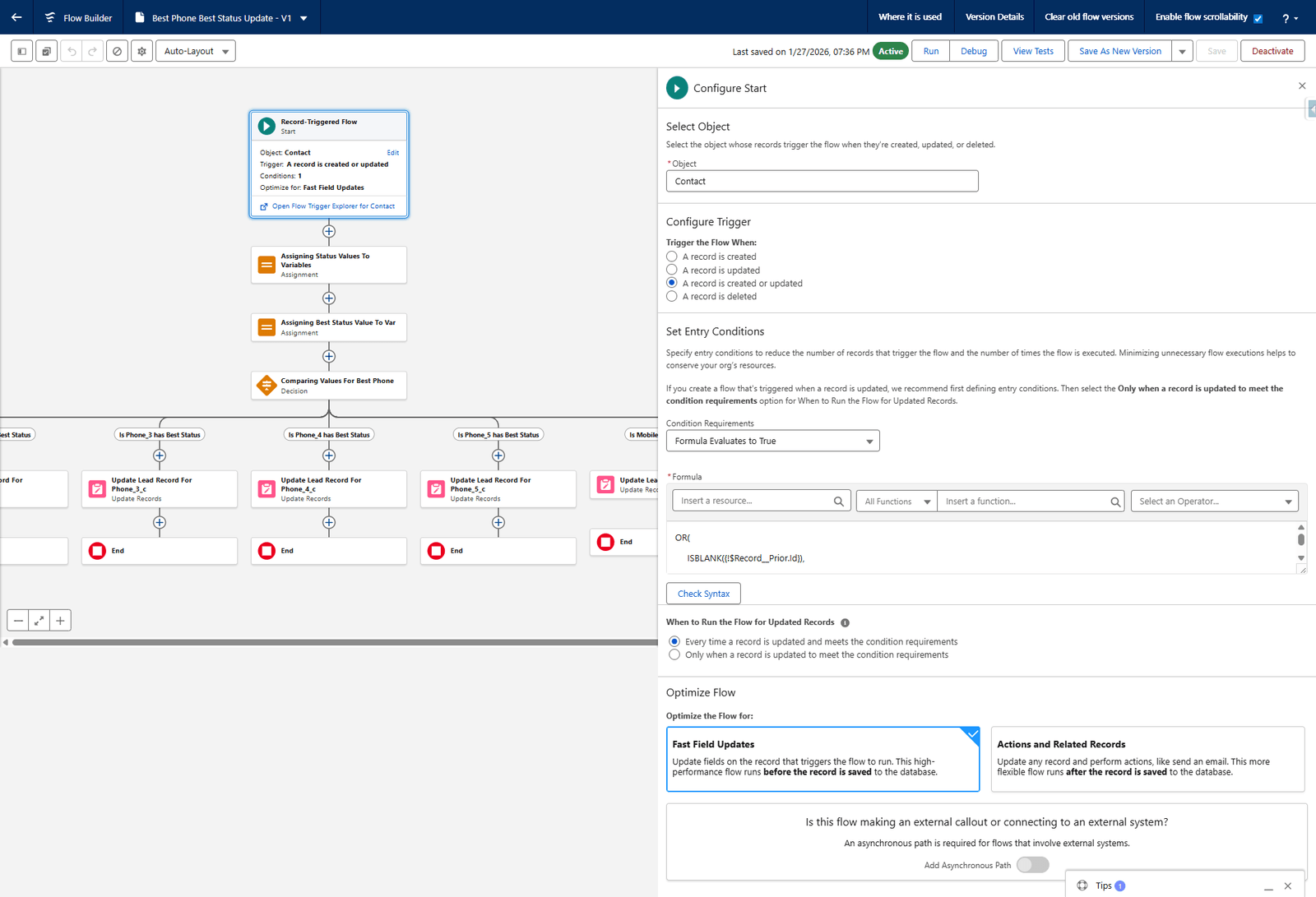
| Type | Record-Triggered Flow, run before save |
| Object | Contact |
| Trigger | A record is created or updated |
| Optimised for | Fast Field Updates |
| Status | Active |
Where: Setup → search Flows → Best Phone Best Status Update
Why "before save" matters
A before-save flow changes the record on its way into the database, in the same transaction that saved it. There is no second update, so:
- the field is correct the instant the record is saved, not a moment later
- it costs a fraction of what an after-save flow costs
- it cannot trigger itself, because no second save happens
The trade-off is that a before-save flow may only update the record that triggered it. That is all this flow needs.
The entry condition
Condition Requirements: Formula Evaluates to True
OR(
  ISBLANK({!$Record__Prior.Id}),
  …
)
$Record__Prior.Id is blank only on a create, so the first branch means "always run for a
new contact". The remaining branches cover the phone and status fields, so an update only
re-runs the flow when one of them actually changed.
When to Run the Flow for Updated Records is set to Every time a record is updated and meets the condition requirements.
The original build document shows this formula truncated in a screenshot, so only the first branch is legible there. Read the live flow before changing it.
What it does, in order
1. Assigning Status Values To Variables
An Assignment that copies the six statuses into variables:
| Variable | Set to |
|---|---|
Phone1_Status_Var | Triggering Contact → Phone Status |
Phone2_Status_Var | Triggering Contact → Phone 2 Status |
Phone3_Status_Var | Triggering Contact → Phone 3 Status |
Phone4_Status_Var | Triggering Contact → Phone 4 Status |
Phone5_Status_Var | Triggering Contact → Phone 5 Status |
Mobile_Status_Var | Triggering Contact → Mobile Status |
2. Assigning Best Status Value To Var
| Variable | Set to |
|---|---|
Best_Status_Var | Getting_Best_Status |
Getting_Best_Status is a formula resource that works out which of the six statuses is the
best one. Its definition is not in the original build document — open the flow to read it.
It is the only piece of judgement in the whole flow; everything after it is mechanical.
3. Comparing Values For Best Phone
A Decision with seven outcomes, evaluated in this order:
| Order | Outcome | Condition |
|---|---|---|
| 1 | Is Phone_1 has Best Status | Phone1_Status_Var equals Best_Status_Var |
| 2 | Is Phone_2 has Best Status | Phone2_Status_Var equals Best_Status_Var |
| 3 | Is Phone_3 has Best Status | Phone3_Status_Var equals Best_Status_Var |
| 4 | Is Phone_4 has Best Status | Phone4_Status_Var equals Best_Status_Var |
| 5 | Is Phone_5 has Best Status | Phone5_Status_Var equals Best_Status_Var |
| 6 | Is Mobile has Best Status | Mobile_Status_Var equals Best_Status_Var |
| 7 | Default Outcome | No conditions |
Order is the tie-break. When two numbers share the best status, the first matching outcome wins — so Phone beats Phone 2, which beats Mobile. If you want a different preference, reorder the outcomes; there is nothing else deciding it.
4. One Update Records element per outcome
Each is an Update Records on the contact record that triggered the flow, with Condition Requirements set to None — Always Update Record:
| Element | Best Phone Status | Best Phone |
|---|---|---|
| Update Lead Record For Phone_1_c | Best_Status_Var | Triggering Contact → Business Phone |
| Update Lead Record For Phone_2_c | Best_Status_Var | Triggering Contact → Phone 2 |
| Update Lead Record For Phone_3_c | Best_Status_Var | Triggering Contact → Phone 3 |
| Update Lead Record For Phone_4_c | Best_Status_Var | Triggering Contact → Phone 4 |
| Update Lead Record For Phone_5_c | Best_Status_Var | Triggering Contact → Phone 5 |
| Update Lead Record For Mobile | Best_Status_Var | Triggering Contact → Mobile Phone |
| Default Update | Best_Status_Var | Blank Value (empty string) |
Each path then ends.
The default path is doing real work
When no status matches the best one, Best Phone is cleared — set to an empty string — while Best Phone Status is still written.
That is deliberate, and it is what keeps the reports honest: a contact with no usable number reports as having no best phone, rather than keeping a stale number from a previous run.
Two naming quirks
"Update Lead Record For …" — these elements act on Contact, not Lead. The names are a leftover. Do not read them as evidence that Leads are involved.
"Phone_1_c" — there is no Phone_1__c field. Outcome 1 is about the standard Phone
field, which the update element calls Business Phone. The numbering in the flow runs 1–5 while
the fields run Phone, Phone 2, Phone 3, Phone 4, Phone 5.
What depends on this
| Depends on it | How |
|---|---|
| The Contact layout | Shows Best Phone and Best Phone Status at the top |
| Most P1 Tracker reports | Filter on Best Phone Status contains P1 |
| The dialler | Calls the best number |
If Best Phone looks wrong across many contacts at once, check the flow is still Active before looking anywhere else.
What goes wrong
| Symptom | Cause |
|---|---|
| Best Phone empty on everybody | The flow is deactivated, or Getting_Best_Status returns nothing. |
| Best Phone stale after a number changed | The entry condition did not match. Check it covers that field. |
| The wrong number is chosen between two equals | Outcome order. Reorder the Decision. |
| Reports count fewer P1s than expected | Best Phone Status is the filter; check it is being written. |
Where this fits
The fields are in Custom fields. The reports that read Best Phone Status are in the P1 Tracker reports.