What an Admin can see
What this setting is
One setting, with three modes, deciding which records every Admin in the portal reaches.
It is not about permissions — an Admin's read, create and edit rights are set separately in Permissions. This decides which records those rights apply to.
Why it exists
By default an Admin sees the records owned by the people they manage. That is usually right, but not always:
- Some companies want an Admin narrowed further, to one kind of record.
- Some want an Admin to see every record of a particular kind, across the whole company, regardless of who owns it.
The three modes cover those cases.
Only a Super Admin can change it
Deliberately. The setting decides how much every Admin can see, so letting an Admin change it would let them widen their own access — and one of the modes reaches outside their group altogether.
Changing it is written to the Audit Log as a permission change.
Where it is
Where: Admin → Users → scroll to Who manages whom → What an Admin can see
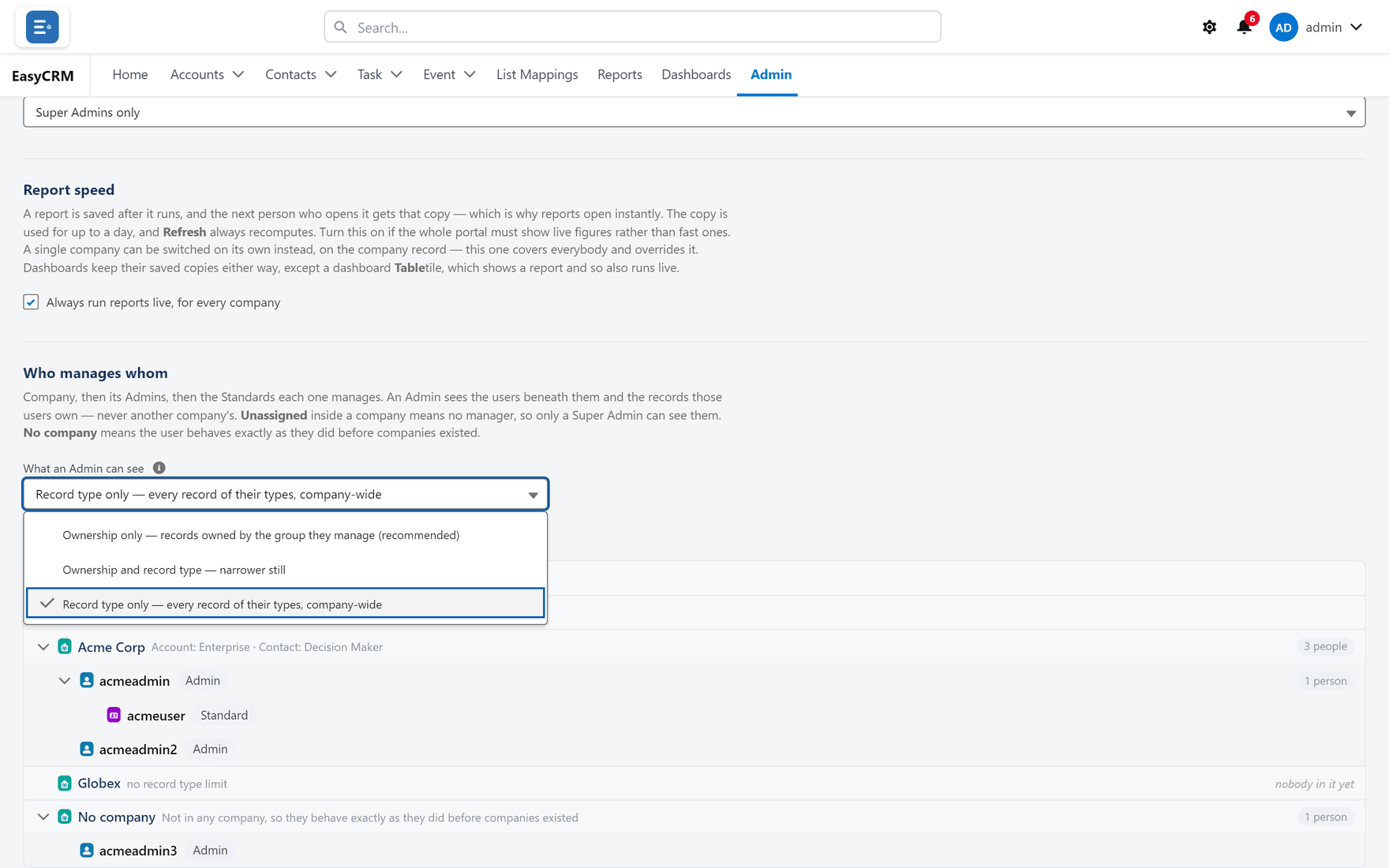
The three modes
| Mode | An Admin sees | Effect |
|---|---|---|
| Ownership only | Records owned by the group they manage | The default. Recommended |
| Ownership and record type | Owned by their group and of a record type they are assigned | Narrower still |
| Record type only | Every record of their types, company-wide, any owner | Wider — reaches outside their group |
Ownership only — the default
An Admin sees records owned by their group: themselves, the users they manage, and the Standard users at their company.
Needs nothing configured. It is the only mode that works correctly out of the box, which is why it is both the default and the recommendation.
Ownership and record type
Both tests must pass: owned by their group and of a record type assigned to them.
On an object that has no record types, the type test cannot fail anybody — so this collapses to ownership rather than blinding the Admin entirely. That is deliberate; the alternative would be an Admin who suddenly sees nothing on objects you never set up record types for.
Record type only — the one that widens
An Admin sees every record of a record type assigned to them, whoever owns it.
This is the only mode that reaches outside the group an Admin manages. It widens their access rather than restricting it.
An Admin under this mode can see records belonging to people they do not manage — including other teams at the same company — as long as the record type matches.
Use it when an Admin is genuinely responsible for a kind of record rather than a group of people. A support lead who should see every support case, no matter who owns it, is the case it exists for.
Choosing
Work down this list and stop at the first that fits.
- Ownership only. Start here. It needs nothing configured and is the safe answer.
- Ownership and record type, if an Admin should be restricted to one kind of record even within their own group.
- Record type only, only if an Admin is responsible for a record type across the whole company — and you have confirmed that is intended.
Testing after a change
The setting applies to every Admin at once, so check before you rely on it.
- Pick an Admin and a record owned by somebody they do not manage.
- Open Record access on that record.
- Confirm the Admin is listed — or not — as you intended.
Under Record type only, expect them to appear. If that surprises you, the mode is wrong.
What goes wrong
| Symptom | Cause |
|---|---|
| An Admin suddenly sees far more | Switched to Record type only, which widens. |
| An Admin sees nothing on one object | Ownership and record type, with no matching type assigned. |
| A list is empty but a record opens fine | Older builds could disagree between the two. Re-check the mode. |
| The change had no effect | The setting is cached. Reload; if it persists, check the audit log recorded it. |
The two settings beside it
The same screen carries two more settings that belong to a Super Admin.
Who may log in as portal users
Controls support impersonation. Super Admins only keeps the feature without handing it to company Admins. Off means nobody, whatever their role.
Changing it does not end a session already running — it decides who may start a new one.
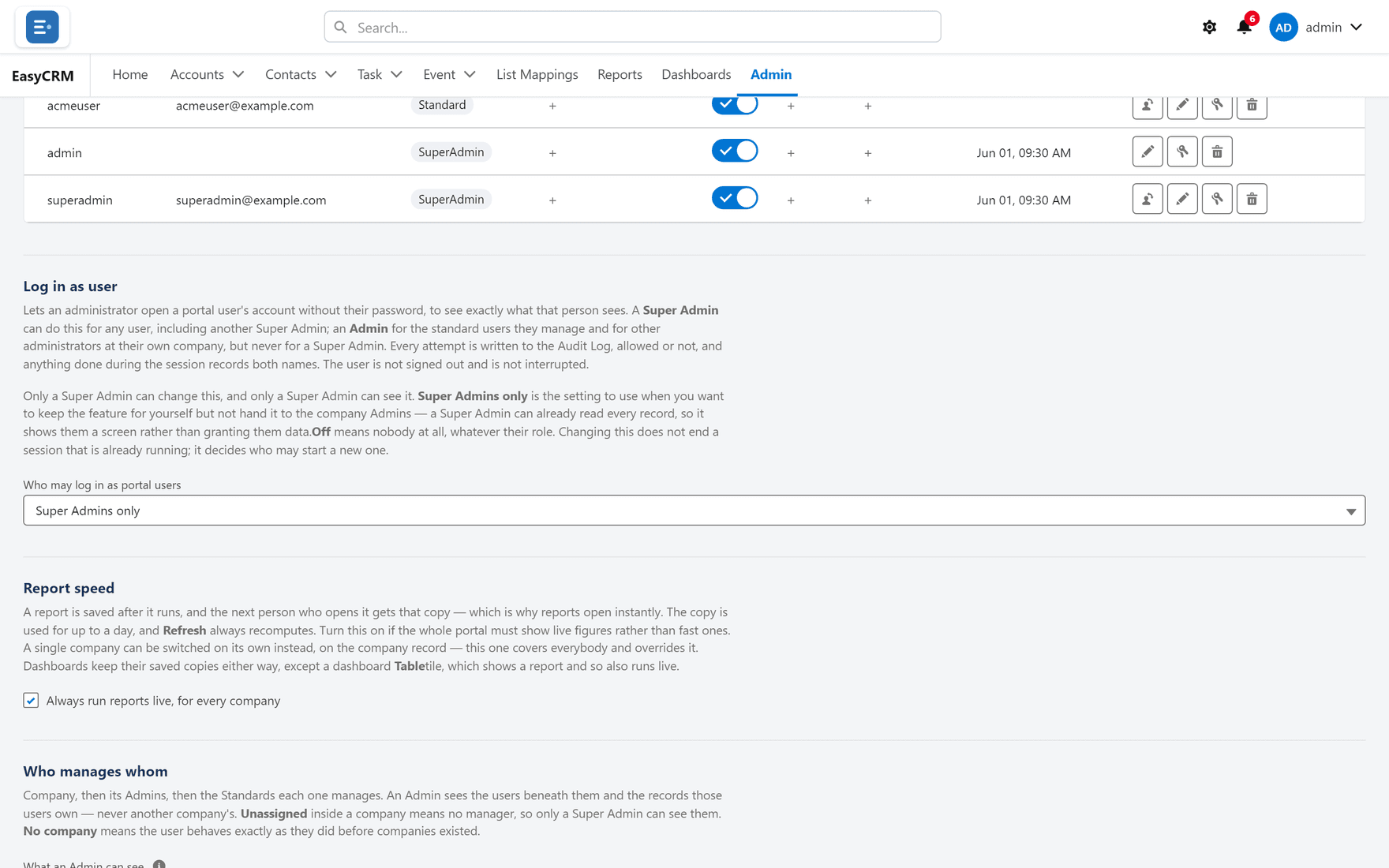
Report speed
A report is saved after it runs, and the next person to open it gets that copy — which is why reports open instantly. The copy is used for up to a day, and Refresh always recomputes.
Tick Always run reports live, for every company when the portal must show live figures rather than fast ones.
| Scope | Everybody. A single company can be switched on its own on the company record; this one overrides it |
| Dashboards | Keep their saved copies either way — except a Table tile, which shows a report and so also runs live |
Turning it on makes every report slower for everybody. Switch one company instead if only one needs it.
Where this fits
This setting narrows or widens what an Admin reaches after permissions decide what they may do, and alongside sharing, which governs everybody. When they disagree, Record access names the winner.